
A little practice. A step forward.
Welcome back!
Your next chapter starts here.
Review subjects follow your exam level.
Choose your review
Your progress
—Avg best score
- Quizzes taken
- —
- Day streak
- —
- Best score
- —
Loading your study activity…
Your study activity could not load. Reload to try again.
Your next step
Checking your study access…
Topic quizzes
Choose a subject or start the recommended topic.
Recommended practice
Explore your subjects
Loading…
Quick practice
Recent practice
Open a completed session to review your answers and explanations.
Loading…
Practice question
Practice results
⭐
Your score
0%
0 of 0 correct
0
Correct
0
Incorrect
0s
Time
Flashcards
Choose a subject to start reviewing.
Pick a subject above
Tap any subject chip to begin reviewing
Mock exams
Build confidence with a complete exam or a shorter practice session.
Pro PDF reviewer
Review offline, at your own pace
The same reviewer questions are included in every download.
Attempt history
No mock tests yet
Complete your first mock test to track your progress here
Account
Manage your profile, access, and study preferences.
Access & subscription
Settings
Exam Type
Subprofessional
Show on leaderboard
Appear in global rankings
Show my leaderboard name
Name in rankings: Checking…
Learning activity
Help & resources
Quiz Review
Loading…
Your progress
See your scores, practice coverage, and study activity.
—Avg best score
- Quizzes taken
- —
- Day streak
- —
- Best score
- —
Your best score in each topic, averaged. Practice activity and answer accuracy are shown separately below.
🔥
0
day streak
Start today! 💪
🌱 Beginner
Performance Overview
Score Trend
Last 20 completed sessions · 80% practice reference
Show:
Performance by Subject
Subject score comparison
Scores against the practice reference
Individual quiz scores · last 4 weeks · ● ≥80% ● <80%
Topic Strengths
Study Activity
Community rankings
Celebrate your progress with learners across all subjects.
Help and guide
Help & Guide
🔐 How to Login
A
Email & Password — Go to the login page, enter your registered email and password, then tap Sign In.
B
Google Sign-In — Tap Sign in with Google, select your Google account, and you'll be redirected back to the app automatically.
✨ New here? Tap Create Account, fill in your name, email, and password, then check your email for a confirmation link to activate your account.
✏️ Daily Quiz
1
Tap Quiz in the bottom navigation.
2
Browse subjects and tap a topic to start. Start with 2 quizzes per day for 7 days. Pro adds 30 days of full practice access.
3
Answer each question. After submitting, you'll see the correct answer and a detailed explanation.
4
Your score is saved automatically. View your history and topic progress in Progress or Recent practice.
💡 Your study streak is updated every day you complete at least one quiz. Keep it going!
📋 Mock Test
1
Tap Mock in the bottom navigation.
2
Open Mock Exams for full-length practice, or choose Mini mock for a shorter, self-paced session. Question counts and time limits follow your selected exam.
3
Answer all items within the time limit. Pro users get unlimited mock and mini mock access.
4
After finishing, review your score, per-subject breakdown, and go through each item with explanations.
🃏 Flash Cards
1
Open Flashcards from Home or More. Choose the subject you want to review.
2
Flip a card to reveal its answer and explanation. Use Previous and Next to move through the cards.
3
Free users review answered questions. Pro users can also choose Question bank to review questions they have not answered yet.
👤 Profile
1
Tap Profile to see your study streak, total attempts, average score, and subscription status.
2
Tap Upgrade Plan to access Pro features.
3
Change your Exam Type (SubProfessional, Professional, or BFP) in Settings.
4
Tap your name or avatar to edit your display name and profile photo.
📊 Analytics
1
Tap Analytics in the bottom navigation to view your full performance dashboard.
2
The Score Trend chart shows your last 10, 20, or 7-day quiz scores with the CSE passing line at 80%.
3
Performance by Subject and Subject Mastery Radar show which topics you're strong or weak in (Pro).
4
Pass Rate Trend, Topic Strengths, and Study Activity Heatmap are all included in the Pro plan.
💡 Use the filter buttons to view All, Quiz, Mock Test, or Mini Mock scores separately.
💳 Plans
Pro
₱99
30-day full access
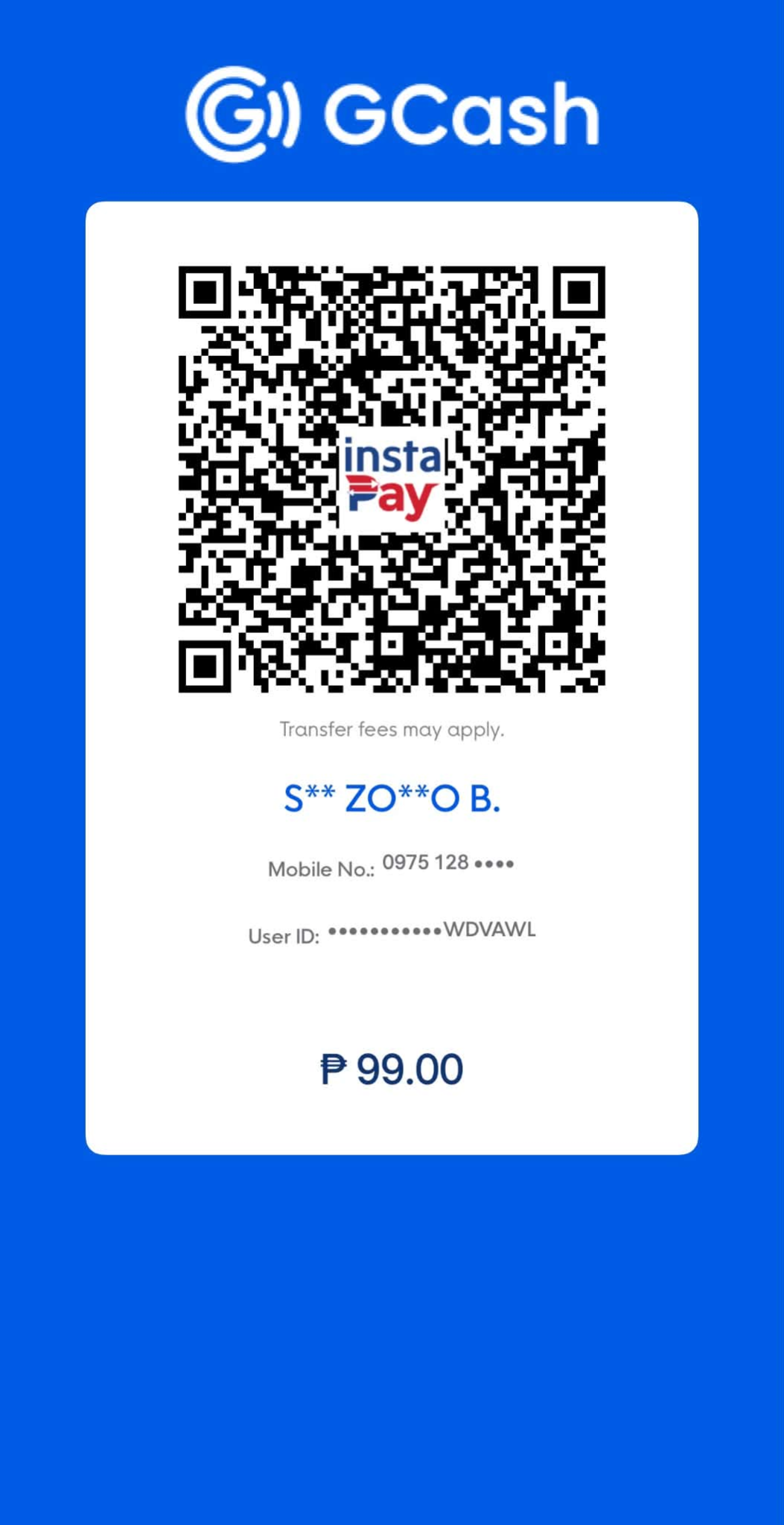
📋 Step-by-Step Payment Guide
1
Tap Continue to Pro payment to open the payment instructions and receipt form.
2
Download the original QR for Pro (₱99), which includes 30 days of access. One payment, no automatic renewal.
3
Open GCash, scan or import the saved QR, and confirm ₱99 to S** ZO**O B. before paying.
4
Take a screenshot of your payment transaction showing the reference number.
5
Return to the payment form, enter the reference number, and upload the screenshot.
6
Submit your payment proof for review. Access starts after approval; allow up to 24 hours for verification.
Always confirm ₱99 and the recipient before paying. If your payment is unresolved after 24 hours, contact CSE Ready on Facebook. Do not send passwords or sign-in codes.
📱 App FAQ
How do I change my exam type (SubPro / Pro / BFP)?
Go to Profile → Settings → Exam Type and select your preferred level. The quiz topics and mock test content will update accordingly.
My plan shows "Free" even after paying — what should I do?
Plans are activated manually within 24 hours after your payment is verified. If it has been more than 24 hours, check that your payment screenshot and reference number were submitted correctly. Contact us if the issue persists.
Can I use the app on multiple devices?
All plans (Free and Pro) allow up to 10 devices. If you reach the limit, you can log out all other devices from the sign-in screen to continue on a new device.
How do I reset my password?
On the login page, tap Forgot Password and enter your email. You'll receive a password reset link. Check your spam folder if you don't see it within a few minutes.
What happens when my plan expires?
New practice is locked when your access ends. Your saved history and results remain available to review. Renew whenever you are ready to practice again.
Can I use Google Sign-In if I already signed up with email?
Yes, as long as the Google account uses the same email address as your CSE Ready account. Both login methods will access the same account.
Is my progress saved if I uninstall or switch phones?
Yes. All your quiz history, scores, and progress are stored in the cloud. Simply log in to your account on any device to access them.
📋 CSE Exam FAQ
Information sourced from official CSC Philippines resources.
About the CSE
What is the Civil Service Examination (CSE)?
The Civil Service Examination (CSE) is administered by the Civil Service Commission (CSC) Philippines to determine eligibility for career service positions in the national and local government. Passing grants a lifetime eligibility that never expires.
What are the two levels of the CSE?
Professional Level (2nd Level) — For college graduates (4-year degree or higher). Qualifies for professional, technical, supervisory, and managerial government positions.
SubProfessional Level (1st Level) — For high school graduates or those with at least 2 years of college. Qualifies for clerical, administrative support, trades, and custodial government positions.
SubProfessional Level (1st Level) — For high school graduates or those with at least 2 years of college. Qualifies for clerical, administrative support, trades, and custodial government positions.
How often is the exam held?
The CSE-PPT (Pen and Paper Test) is held twice a year — second Sunday of March and second Sunday of August.
The COMEX (Computer-Assisted Test) is available throughout the year at CSC testing centers.
The COMEX (Computer-Assisted Test) is available throughout the year at CSC testing centers.
Eligibility & Requirements
Who can take the Civil Service Exam?
You must be:
• A Filipino citizen (dual citizens with RA 9225 certification are allowed)
• At least 18 years old at time of application
• Not convicted of crimes involving moral turpitude, dishonesty, or exam irregularity
• Not have taken the same level of CSE within the last 3 months
• A Filipino citizen (dual citizens with RA 9225 certification are allowed)
• At least 18 years old at time of application
• Not convicted of crimes involving moral turpitude, dishonesty, or exam irregularity
• Not have taken the same level of CSE within the last 3 months
What are the education requirements?
Professional Level: Four-year college degree or higher.
SubProfessional Level: High school graduate or at least 2 years of college education.
SubProfessional Level: High school graduate or at least 2 years of college education.
Registration
How do I register for the CSE?
Registration is done online via the CSC OCSEAS system:
1. Go to ocseas.csc.gov.ph and create an account
2. Activate your account via the confirmation email
3. Log in, update your profile, and select your exam level and testing center
4. Upload required documents (JPEG format, max 5MB each)
5. Complete the application within 1 hour — it auto-cancels if unfinished
1. Go to ocseas.csc.gov.ph and create an account
2. Activate your account via the confirmation email
3. Log in, update your profile, and select your exam level and testing center
4. Upload required documents (JPEG format, max 5MB each)
5. Complete the application within 1 hour — it auto-cancels if unfinished
What is the application fee?
• CSE-PPT (Pen and Paper): ₱500
• COMEX (Computer-Assisted): ₱680
• COMEX (Computer-Assisted): ₱680
What documents are required for application?
• Accomplished CS Form No. 100 (Revised 2023)
• 4 pcs 2×2 ID photo with handwritten name tag and signature
• Valid ID — original + photocopy (same ID used at application)
• Examination fee
• PSA/LCR Birth Certificate (only if your valid ID lacks date of birth)
• 4 pcs 2×2 ID photo with handwritten name tag and signature
• Valid ID — original + photocopy (same ID used at application)
• Examination fee
• PSA/LCR Birth Certificate (only if your valid ID lacks date of birth)
What to Study
What subjects are in the Professional Level?
The Professional exam has 170 items covering:
• Verbal Ability — Vocabulary, grammar, reading comprehension
• Numerical Ability — Number sequences, basic operations, word problems
• Analytical Ability — Word analogy, logical reasoning
• Data Interpretation — Analysis and synthesis
• General Information — Philippine Constitution, code of conduct, peace & human rights, environmental issues
• Verbal Ability — Vocabulary, grammar, reading comprehension
• Numerical Ability — Number sequences, basic operations, word problems
• Analytical Ability — Word analogy, logical reasoning
• Data Interpretation — Analysis and synthesis
• General Information — Philippine Constitution, code of conduct, peace & human rights, environmental issues
What subjects are in the SubProfessional Level?
The SubProfessional exam has 165 items covering:
• Verbal Ability — Vocabulary, grammar
• Organization of Ideas
• Clerical Ability
• Spelling
• Numerical Reasoning
• General Information — Philippine Constitution, code of conduct, peace & human rights
• Verbal Ability — Vocabulary, grammar
• Organization of Ideas
• Clerical Ability
• Spelling
• Numerical Reasoning
• General Information — Philippine Constitution, code of conduct, peace & human rights
Exam Day
What should I bring on exam day?
✅ Valid ID (Original) — same ID used during application. No ID = No Exam.
✅ Black ball pen only — pencils, gel pens, and colored pens are NOT allowed
✅ Application receipt or CSC official receipt (for your Examinee Number)
✅ Transparent bag (recommended)
❌ NOT allowed: Pencils, calculators, books, dictionaries, tablets, or any electronic devices.
✅ Black ball pen only — pencils, gel pens, and colored pens are NOT allowed
✅ Application receipt or CSC official receipt (for your Examinee Number)
✅ Transparent bag (recommended)
❌ NOT allowed: Pencils, calculators, books, dictionaries, tablets, or any electronic devices.
How long is the exam?
• Professional Level: 3 hours 10 minutes of testing (plus ~1 hour before & after for admin activities)
• SubProfessional Level: 2 hours 40 minutes of testing (plus ~1 hour before & after)
• SubProfessional Level: 2 hours 40 minutes of testing (plus ~1 hour before & after)
Results
What is the passing score?
You must achieve a general rating of at least 80% to pass the Civil Service Examination at either level.
How do I check my results?
Results are posted online — the CSC does not mail individual results.
• List of Passers: www.csc.gov.ph
• Individual Results: exam.csc.gov.ph using your Examinee Number
• List of Passers: www.csc.gov.ph
• Individual Results: exam.csc.gov.ph using your Examinee Number
How do I claim my Certificate of Eligibility?
• Visit the CSC Regional/Field Office with jurisdiction over your testing center
• You must claim it personally — representatives are not allowed
• Temporary CoE: Free, valid 2 years from issuance
• Permanent CoE (Security Paper): ₱100 per copy, valid indefinitely
• You must claim it personally — representatives are not allowed
• Temporary CoE: Free, valid 2 years from issuance
• Permanent CoE (Security Paper): ₱100 per copy, valid indefinitely
After Passing
Does my eligibility expire?
No. Your Civil Service Eligibility is valid for life. Once you pass, your eligibility never expires and can be used anytime for government employment.
What government positions can I apply for after passing?
Professional Level — Qualifies for both 1st and 2nd level positions: professional, technical, supervisory, and managerial government roles.
SubProfessional Level — Qualifies for 1st level positions: Administrative Aide, Clerk, Driver (if qualified), Utility Worker, and other support positions.
Browse open government positions at csc.gov.ph/career.
SubProfessional Level — Qualifies for 1st level positions: Administrative Aide, Clerk, Driver (if qualified), Utility Worker, and other support positions.
Browse open government positions at csc.gov.ph/career.
🔥 Fire Officer Examination (FOE)
What is the Fire Officer Examination (FOE)?
The Fire Officer Examination (FOE) is a special eligibility exam administered by the Civil Service Commission (CSC) Philippines specifically for fire protection positions in the Bureau of Fire Protection (BFP). Passing grants a Fire Officer Eligibility — a 2nd level eligibility valid for BFP and fire protection roles. It is separate from the Career Service Professional/SubProfessional eligibility.
Who can take the Fire Officer Examination?
Requirements:
• Filipino citizen
• Age 21–35 at time of application (age limit is waived for incumbent or former BFP employees)
• At least a Baccalaureate Degree from a recognized college or university
• No pending criminal charges or conviction for crimes involving moral turpitude
• Must not have previously passed the FOE or hold a Career Service Professional eligibility
• Filipino citizen
• Age 21–35 at time of application (age limit is waived for incumbent or former BFP employees)
• At least a Baccalaureate Degree from a recognized college or university
• No pending criminal charges or conviction for crimes involving moral turpitude
• Must not have previously passed the FOE or hold a Career Service Professional eligibility
When is the Fire Officer Exam held?
The FOE is held once a year, typically in June.
• 2026 Schedule: June 7, 2026 (8:00 AM – 11:05 AM)
• Exact dates, venues, and deadlines are announced on the official CSC website at www.csc.gov.ph.
• 2026 Schedule: June 7, 2026 (8:00 AM – 11:05 AM)
• Exact dates, venues, and deadlines are announced on the official CSC website at www.csc.gov.ph.
What subjects are covered in the FOE?
The exam has 160 items total (150 test items + 10 Efficiency and Discipline Questionnaire items):
• General Ability — 25% (verbal, numerical, analytical reasoning)
• Fire Suppression Operations — 30% (firefighting techniques, equipment, tactics)
• Fire Safety & Prevention — 20% (fire prevention, inspection, codes)
• Fire Investigation — 15% (origin, cause, evidence, arson)
• Administrative Matters — 10% (BFP rules, civil service law, RA 9514)
• General Ability — 25% (verbal, numerical, analytical reasoning)
• Fire Suppression Operations — 30% (firefighting techniques, equipment, tactics)
• Fire Safety & Prevention — 20% (fire prevention, inspection, codes)
• Fire Investigation — 15% (origin, cause, evidence, arson)
• Administrative Matters — 10% (BFP rules, civil service law, RA 9514)
What is the passing score for the FOE?
You must achieve a general rating of at least 80% to pass the Fire Officer Examination — the same passing mark as the Career Service Examination.
How do I apply for the Fire Officer Exam?
Applications are submitted online through the CSC eSERVE portal:
1. Go to services.csc.gov.ph and create/log in to your account
2. Select the Fire Officer Examination from the list of exams
3. Fill out the application form and upload required documents
4. Pay the exam fee of ₱700 via the available payment channels
Always check www.csc.gov.ph for official application period announcements.
1. Go to services.csc.gov.ph and create/log in to your account
2. Select the Fire Officer Examination from the list of exams
3. Fill out the application form and upload required documents
4. Pay the exam fee of ₱700 via the available payment channels
Always check www.csc.gov.ph for official application period announcements.
What eligibility does passing the FOE grant?
Passing grants Fire Officer Eligibility — a 2nd level career service eligibility specifically for:
• Fire Officer positions in the Bureau of Fire Protection (BFP)
• Other fire protection-related government positions
Important: Fire Officer Eligibility is not interchangeable with Career Service Professional eligibility. It qualifies you for BFP fire officer roles but does not qualify you for general 2nd level government positions outside fire protection.
For BFP career information, visit www.bfp.gov.ph.
• Fire Officer positions in the Bureau of Fire Protection (BFP)
• Other fire protection-related government positions
Important: Fire Officer Eligibility is not interchangeable with Career Service Professional eligibility. It qualifies you for BFP fire officer roles but does not qualify you for general 2nd level government positions outside fire protection.
For BFP career information, visit www.bfp.gov.ph.
📚
CSE Ready
Civil Service Exam Reviewer PH
Version 5.0
6,500+ Questions
SubPro · Pro · BFP
⚠️ Independent Reviewer — Not Affiliated with CSC
CSE Ready is a private, independent study tool created to help you prepare for the Civil Service Examination. It is not affiliated with, endorsed by, or connected to the Civil Service Commission (CSC) of the Philippines in any way.
All exam information, schedules, and guidelines should be verified through the official CSC website at www.csc.gov.ph.
CSE Ready is a private, independent study tool created to help you prepare for the Civil Service Examination. It is not affiliated with, endorsed by, or connected to the Civil Service Commission (CSC) of the Philippines in any way.
All exam information, schedules, and guidelines should be verified through the official CSC website at www.csc.gov.ph.
🏛️
Official Civil Service Commission
For official exam schedules, registration, results, and announcements —
always refer to the CSC Philippines official website.
Visit www.csc.gov.ph →
CSE Ready v5.0 · Independent reviewer — not affiliated with CSC Philippines
Exam information sourced from www.csc.gov.ph
Exam information sourced from www.csc.gov.ph
Loading…